Purple Butterfly Digital Paper: A Practical Guide to Integration and Workflow
Digital design assets are only as useful as the workflow they support. A pattern set like Purple Butterfly Digital Paper is not simply a collection of pretty backgrounds — it is a resource that can streamline creative production, maintain visual consistency, and reduce repetitive design work across multiple projects. Understanding how to slot such assets into your existing process makes the difference between owning a file and actually using it effectively.
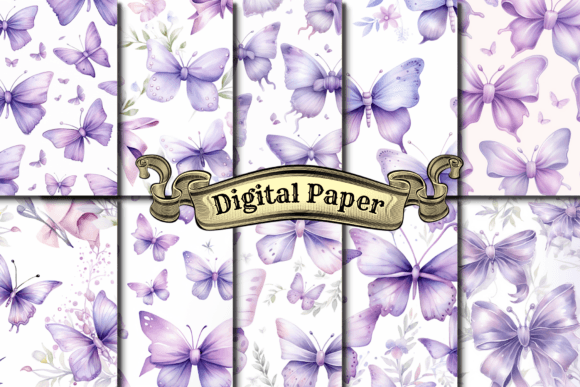
This set includes 10 JPG and PNG digital paper files, each sized at 4000 x 4000 pixels. That resolution alone tells you something about intent: these are not thumbnail decorations. They are production-ready assets meant for print-on-demand, large-format wall art, fabric printing, and any scenario where pixel density and sharpness matter. The butterfly motif in purple tones gives you a specific aesthetic direction — floral, whimsical, yet sophisticated — which can anchor a brand line, a product collection, or a seasonal release.
What Purple Butterfly Digital Paper Is and Where It Fits
Purple Butterfly Digital Paper is a patterned texture set designed for digital and print use. Each file is a seamless or repeatable pattern that can be applied as a background, a fabric print, a book cover, a phone case wrap, or a website banner. The format — JPG and PNG — means it is immediately compatible with nearly any design software, from Adobe Photoshop and Illustrator to Affinity, Canva, Procreate, and even web-based tools like Figma or Shopify’s asset uploader.
Where it fits in a broader process depends on your role. A small business owner launching a stationery line might use it as a recurring motif across notebooks, planners, and greeting cards. A print-on-demand seller can apply it to multiple product mockups in a single session because the 4000 px size works across apparel, home decor, and accessories without rescaling. A graphic designer handling branding for a boutique brand could pull the purple tones and butterfly shapes into a broader visual system — color palette, iconography, packaging pattern — using the digital paper as a starting reference rather than a final output.
The asset is not a template. It does not do the layout for you. But it gives you a consistent, high-quality visual element that can be reused, recolored, cropped, or overlaid. That is where its value in a workflow becomes clear: it removes the need to generate a pattern from scratch each time.
Before the Project: Preparation and Asset Planning
Integrating any digital paper set into your process works best when you plan before you design. If you are preparing a product launch or a content calendar, consider these preparatory steps:
- Audit your color palette. Purple Butterfly Digital Paper uses specific purple tones. Check whether those match your existing brand colors or the mood you want for a specific campaign. If they are close, you can use the paper as an accent. If they are off, you might need to adjust saturation or hue in your editing software — the 4000 px PNG preserves quality through color adjustments.
- Decide on usage frequency. Will this pattern appear on one product type or across an entire collection? That decision affects how many file variations you need. For example, using the same pattern on a phone case, a T-shirt, and a notebook ensures brand cohesion but might feel repetitive. You can alternate between the 10 different patterns in the set to maintain variety while keeping the visual family intact.
- Check your platform requirements. Print-on-demand services like Printful, Redbubble, or Society6 have specific file size and format guidelines. The 4000 x 4000 px dimension at 300 DPI is generally sufficient for most products, but always verify aspect ratios. For apparel, you may need to crop or position the pattern within a smaller area. Knowing that upfront saves rework.
Preparation also means organizing your files. Name each pattern clearly before you start designing. Instead of keeping generic filenames, rename them by dominant color, motif density, or intended use — for example, “purple-butterfly-dense-repeat.png” or “butterfly-light-accent.jpg.” That small habit speeds up later selection when you are in the middle of a design session and need to find a specific texture quickly.
During the Creative Process: Practical Implementation
Once you begin designing, Purple Butterfly Digital Paper can function in several roles within your active workflow.
As a Background Layer
The most straightforward use is as a background for wall art, printable quotes, social media graphics, or website banners. Because the file is already 4000 px, you can place it directly into a document without scaling up and losing quality. In Photoshop or Canva, set it as the bottom layer and overlay text, icons, or photos on top. The purple tones are strong enough to stand alone but neutral enough to support foreground elements if you adjust opacity or add a soft shadow.
As a Textile or Product Wrap
For print-on-demand products, the pattern needs to cover a surface without obvious seams or awkward cropping. The 4000 px size helps here because you can tile or stretch the pattern across a shirt, a tote bag, or a pillow cover. In software like Affinity Designer or Illustrator, you can create a pattern swatch from the PNG and then apply it to any vector shape. That technique gives you precise control over scale and rotation, letting you adapt the butterfly motif to different product dimensions without distorting the image.
As a Design Reference
Sometimes the best use of a digital paper set is not as a final element but as a visual guide. If you are designing a brand identity, you can extract colors from the pattern using an eyedropper tool to build a cohesive palette. The butterfly shapes can inspire custom vector icons or motifs. The overall composition — whether dense or sparse, symmetrical or organic — can influence your layout choices. This is a more conceptual integration, but it is especially useful for graphic designers and branding professionals who need to maintain a consistent look across multiple deliverables.
In Silhouette and Cricut Projects
For physical craft projects using cutting machines, Purple Butterfly Digital Paper can be imported as a printable image. Print the pattern onto adhesive vinyl, transfer paper, or printable fabric sheets, then cut your shapes. The 4000 px resolution means you can print at a large size without pixelation, which is critical when you are covering a large surface like a tote bag or a wall decal. Keep in mind that PNG format with a transparent background may be more useful for cutting machines if you want only the patterned area without a backing color — check whether your specific pattern file includes transparency or a solid background.
After the Project: Archiving, Repurposing, and Consistency
The work does not end when the design is exported. Post-project steps determine whether you can reuse the asset efficiently later.
- Archive with metadata. Save the original files in a dedicated folder, and include a simple text or spreadsheet note about which projects used which pattern. If you run a small business, this becomes invaluable when a customer asks for a variation of a past product.
- Create derivative assets. Once you have the base pattern, you can generate variations: desaturated versions for backgrounds, high-contrast versions for phone cases, or cropped sections for social media icons. Doing this in batch after the main project saves time later and ensures consistency across your product line.
- Monitor consistency across products. If you use the same pattern on a notebook and a T-shirt, check that the print quality looks similar on both substrates. Digital previews in POD platforms can be misleading. Order a sample if possible, or adjust your file settings (sharpening, contrast, color profile) based on the platform’s recommendations.
Integration with Tools, Platforms, and Other Assets
Purple Butterfly Digital Paper interacts with your existing toolkit in several practical ways. In design software, you can load the PNG into a pattern library for one-click access. In web design tools like Squarespace or Shopify, you can upload it as a background image for product pages or email headers. For social media scheduling platforms like Canva or Later, you can store the file in a brand kit so your team can apply it without hunting through folders.
The asset also pairs well with other design resources. Combine it with solid-color vector shapes, hand-lettered typography, or botanical illustrations. The butterfly motif is organic rather than geometric, so it works naturally with soft, flowing design styles. Avoid pairing it with extremely busy patterns or high-contrast geometric backgrounds, as the visual noise will reduce the impact of both elements.
Usability and Quality Control Considerations
Working with 4000 x 4000 px files has practical implications. These files are large — typically several megabytes each. That is fine for print or desktop software, but it can slow down browser-based tools or mobile apps. If you experience lag, create a resized copy (2000 px or 1000 px) for preliminary layout work, then swap in the full-resolution version before export. That small workflow adjustment keeps your design process fluid without sacrificing final quality.
Color consistency is another factor. Purple tones can shift between screens and print outputs. If you are designing for print, convert the file to CMYK mode if your POD platform requires it, and check that the purple does not turn muddy or dull. Many platforms accept RGB and convert automatically, but results vary. A quick test print or soft-proofing in Photoshop can save disappointment later.
Long-term use depends on how well you maintain the files. Store them in a cloud-backed folder with a clear naming convention. If you update your brand colors or shift your aesthetic direction, you may want to create recolored versions of the patterns using hue/saturation adjustments — the 4000 px base gives you room to do that without quality loss.
Practical Workflow Example: Launching a Stationery Collection
Imagine you are a small business owner preparing a spring stationery line. You have Purple Butterfly Digital Paper as your core pattern set. Here is how a streamlined workflow might look:
- Planning: Choose three of the ten patterns that share a similar lightness level. These will become your notebook covers, planner dividers, and greeting card backgrounds.
- Design: In Canva, place each pattern on an 8.5 x 11 inch document at full resolution. Add your title, logo, and line elements. Export as print-ready PDFs.
- Production: Upload to a print partner like Printify or a local printer. Verify that the file dimensions match the product template (notebook cover, card).
- Marketing: Use the same patterns as Instagram story backgrounds and website hero images. Crop a small section for a favicon or social avatar.
- Post-launch: Archive the project files alongside the original digital paper. Note which patterns sold best. For the next season, you can recolour the same patterns or combine them with complementary textures.
This sequence shows how a single asset set can flow through planning, design, production, marketing, and archiving without needing new resources at each stage. The efficiency gain comes from having a ready-made, consistent visual element that adapts to different formats and platforms.
Final Observations on Long-Term Value
Purple Butterfly Digital Paper is not a trend-dependent asset. Butterfly motifs have enduring appeal in fashion, home decor, and stationery. The purple color family is versatile enough to feel both calm and luxurious, making it suitable for everything from wedding invitations to wellness brands. The 4000 px resolution ensures that the files remain usable as platforms upgrade their requirements or as you expand into larger-format products like blankets, duvet covers, or wall murals.
The real value, however, is in how you integrate the asset into your own routines. Digital paper sets are tools, not finished products. Your workflow — preparation, active design, post-project archiving, and cross-platform application — determines how much return you get from the investment. By treating Purple Butterfly Digital Paper as a modular, reusable component rather than a one-off background, you build a more efficient creative process that saves time, maintains visual consistency, and leaves you free to focus on the parts of your work that truly need original input.