Watercolor Wildflower PNG Clipart: A Practical Guide for Spring Design Projects
When spring arrives, many designers, crafters, and small business owners start looking for visuals that capture the season's lightness and natural beauty. Watercolor Wildflower PNG Clipart has become a popular go to for those aiming to bring a soft, hand painted feel to digital and print projects. But like any design resource, it works best in certain contexts and may fall short in others. Understanding its strengths, limitations, and how it compares with other clipart styles will help you make a more informed choice for your next project.
What Makes Watercolor Wildflower PNG Clipart Distinct?
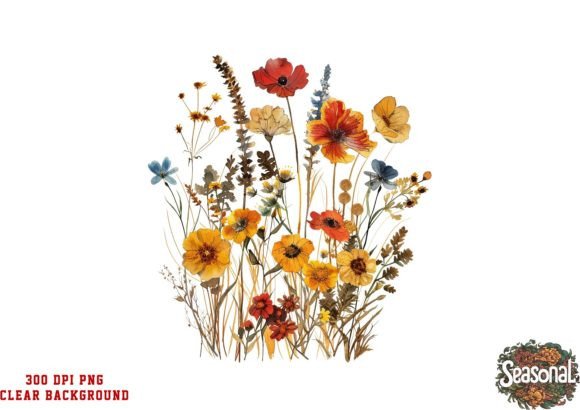
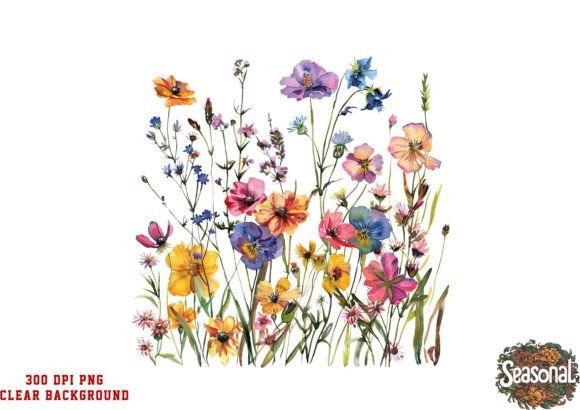
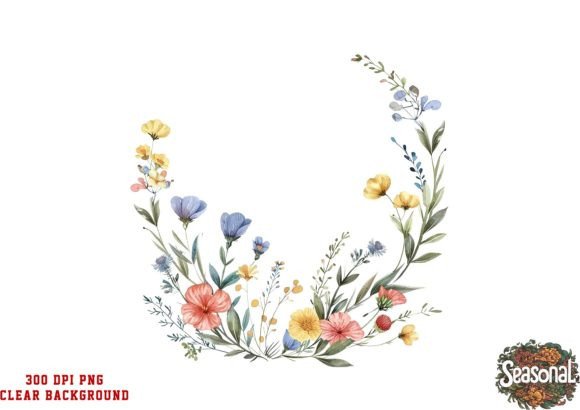
Watercolor Wildflower PNG Clipart is essentially a digital image file that simulates the look of watercolor paint. Unlike vector graphics, which use mathematical paths, this clipart is made of pixels, often scanned or digitally painted to create soft edges, color gradients, and organic textures. The wildflower motif adds a relaxed, meadow like feel that suits spring themes, garden events, or nature inspired branding.
The Watercolor Effect and Wildflower Motifs
The key distinction here is the artistic quality. Watercolor clipart has a unpredictability: colors bleed into one another, edges are never perfectly sharp, and the overall look is more organic than a typical crisp digital illustration. Wildflower motifs specifically tend to feature loosely arranged blooms, leaves, and stems that look as though they were painted on paper. This makes them particularly effective for projects that aim for a handmade, nostalgic, or rustic tone.
PNG Format and Resolution Considerations
PNG (Portable Network Graphics) supports transparent backgrounds, which is essential for layering clipart over other designs without a white box around it. The clipart described here offers a high resolution of 300 DPI, meaning it holds up well in print. 300 DPI is standard for professional printing, so you can use this clipart for invitations, wall art, or product packaging without worrying about pixelation. However, because it is a raster image, scaling it up too much may reduce sharpness, something to keep in mind if you plan to use it on large banners or signage.
How Does It Compare with Other Clipart Styles?
To decide whether Watercolor Wildflower PNG Clipart is right for you, it helps to place it alongside other common clipart types. Each style has its own tradeoffs in terms of flexibility, visual impact, and ease of use.
Watercolor vs. Vector Clipart
Vector clipart, such as SVG or AI files, is built from points and curves, which allows infinite scaling without losing quality. Vectors are ideal for logo design, large format prints, or projects that require frequent resizing. Watercolor PNG clipart, by contrast, offers a more painterly aesthetic that vectors often lack unless heavily processed. If your priority is artistic flair over scalability, watercolor clipart wins. If you need a logo that can be resized from a business card to a billboard, vector is the better route.
Watercolor vs. Realistic Photography
Photography provides the highest level of detail and realism, but it can be harder to blend into a design without looking like a pasted image. Watercolor clipart sits between photography and flat illustration: it has decorative charm but is less literal. For wedding invitations, many people prefer watercolor florals because they feel romantic and timeless, whereas photography might feel too specific or casual. On the other hand, if you need botanical accuracy for educational content, photography or botanical illustration may be more suitable.
Watercolor vs. Flat Design Icons
Flat design uses simple shapes and solid colors, making it great for modern, minimalist branding. Watercolor clipart is more detailed and textured, which can clash with a sleek, clean brand identity. For preppy or spring themed social media graphics, watercolor often feels more inviting and organic. Flat icons, however, load faster on websites and work better as UI elements because they are predictable and consistent. Consider the overall tone of your project before choosing.
Strengths and Best-Fit Situations
Watercolor Wildflower PNG Clipart shines in projects where a personal, handcrafted touch is valued. Its transparency and high resolution make it straightforward to drop into a layout without extra editing.
Ideal for Wedding and Event Design
Wedding invitations, thank you cards, place cards, and table numbers often benefit from soft floral embellishments. A single watercolor wildflower clipart can be used as a central motif, a border element, or a subtle background texture. Because it blends seamlessly, you can place it over colored or patterned papers and retain a natural look. For a wedding with a garden or rustic theme, this clipart type is often a strong choice.
Great for Small-Scale Personal Projects
For hobby crafters making scrapbooks, greeting cards, or bullet journal covers, watercolor wildflower clipart adds an artistic flair without requiring painting skills. The 300 DPI resolution ensures that even small prints remain crisp. Many compatibility mentions, including Canva, Photoshop, and Picmonkey, indicate that this clipart can be used by people with varying levels of design experience. If you are new to graphic design, starting with a single watercolor PNG file is a low risk way to learn layering and composition.
Seamless Blending in Large Areas
One mentioned strength is that the clipart "seamlessly blends for flawless use across large areas." This likely refers to the soft edges and transparent background that allow the clipart to transition smoothly into a background. For instance, if you are designing a spring banner for a website or a poster, you can stretch the clipart as a background element without harsh lines. However, because it is a single raster file, using it over very large areas may require careful placement to avoid a tiled or repetitive look.
Tradeoffs and Limitations to Consider
Every design resource has boundaries. Knowing them upfront prevents frustration later.
Limited Variety with a Single Clipart
The description notes you will receive a total of one clipart. For some projects, one piece is enough, especially if you need a simple accent. But if your design requires multiple flowers, different angles, or a range of sizes, a single clipart may feel repetitive. You could duplicate and resize or flip the image, but if variety matters, you might need a set with multiple elements. Compare single clipart offerings with bundles that include several illustrations, leaves, and stems for more compositional freedom.
Compatibility and Scaling Concerns
While PNG files work in most design software, they are not editable in the same way vectors are. You cannot easily change the color of a petal or adjust the watercolor texture without advanced photo editing skills. If you need to match a specific brand palette, a vector file with fill colors might be more practical. Also, because this is a raster image, scaling it up beyond its original dimensions may cause blurriness. Always check the pixel dimensions of the PNG before using it in large formats.
File Size and Resolution Requirements
300 DPI files can be large, especially with watercolor textures that contain many color variations. This can slow down software like Canva or Picmonkey if you are working with multiple high resolution images. For web use, you might need to resize the clipart to a lower resolution to keep page load times fast. Consider whether your final output is primarily print or digital, and plan accordingly.
When to Choose Watercolor Wildflower PNG Clipart and When to Look Elsewhere
This clipart is a solid choice if your project aligns with a spring, preppy, or nature inspired aesthetic and you value a painterly look over technical flexibility. It works well for printed wedding stationery, small batch greeting cards, social media posts, and personal craft projects where the design is meant to feel warm and artistic.
You may want to explore other options if:
- You need scalability for large banners or signage. In that case, consider vector clipart or a high resolution file with very large pixel dimensions.
- You require color editing to match a strict brand palette. Look for layered vector files or editable formats like EPS or AI.
- You need multiple flowers or scenes. A single clipart may not provide enough variety for complex compositions. Look for sets with several elements.
- You are designing for a modern, minimalist brand. Watercolor's organic texture may clash with a clean, flat identity. Consider simple line art or geometric graphics.
- Your project is heavily digital and must load quickly on websites. PNG watercolor files can be heavy, so you may need to compress them or use lighter formats like SVG.
It is always wise to read the product description carefully. Check the file dimensions, whether the background is truly transparent, and what software the creator recommends. That way you can match the resource to your specific workflow.
Practical Examples for Researching and Evaluating Options
If you are comparing watercolor wildflower clipart with other resources, think about the final use. For instance, a wedding invitation designed on Canva might work perfectly with a single watercolor PNG placed as a corner accent. But if you are designing a wrap for a boutique product, you might need a pattern or repeated motif; in that case, a set of watercolor wildflowers might be more effective than a single image.
When evaluating online, look at how designers in your niche use watercolor florals. Notice whether they rely on one clipart or combine several. Also consider the resolution offered: 300 DPI is excellent for print, but if you only need digital use, a 150 DPI file might suffice and be easier to manage.
Testing the clipart in your own software before committing is ideal if a preview is available. Many sellers provide sample downloads. This allows you to check blending, transparency, and how the watercolor look fits with your other design elements.
Ultimately, Watercolor Wildflower PNG Clipart is one tool in a larger palette. It brings a specific feel that is hard to replicate with other styles. By understanding its strengths, knowing its limitations, and comparing it with alternatives, you can decide whether it is the right fit for your spring project or whether another format serves you better. Making a thoughtful choice now can save you time and help your designs feel cohesive from the start.