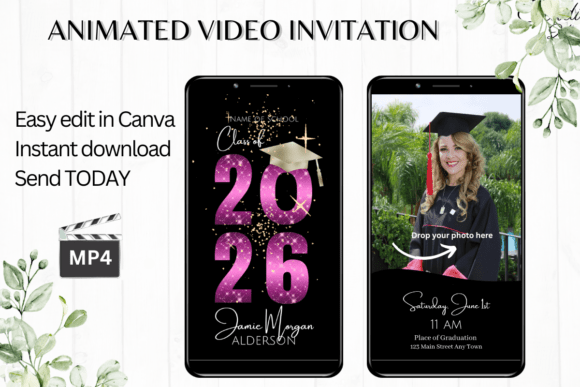
Fun Animated Graduation Invitation for Modern Celebrations
Graduation is one of those milestones that deserves more than a plain text message or a static image. Whether you're celebrating a high school diploma, a college degree, or a certificate from a specialized program, the way you invite people sets the tone for the entire event. A Fun Animated Graduation Invitation brings your announcement to life with motion, color, and personality—making it feel special from the moment someone opens it on their phone.
Unlike printed cards that require mailing costs and waiting periods, a digital animated video invitation lets you share the excitement immediately. You control the design, the message, and the timing. And because it lives on a screen, recipients can watch it again, forward it to others, or save it as a keepsake. That kind of flexibility is hard to beat when you're juggling final exams, planning a party, or just trying to keep things simple.
What Makes a Digital Animated Video Invitation Template Stand Out
A digital animated video invitation template is not a generic image with text slapped on top. It's a fully designed video file that includes motion graphics, transitions, and sometimes subtle sound cues. The Fun Animated Graduation Invitation templates available today are built at 1080 x 1920 pixels, which means they look crisp on any smartphone screen and fill the frame perfectly when shared via messaging apps.
What makes these templates particularly useful is the level of control you have without needing any design background. You get immediate access to edit the template in Canva from your computer or phone. There's no software to download, no fonts to install, and no waiting for proofs to come back from a designer. You make the changes yourself, in real time, and see exactly what the final invitation will look like before you download it.
Editing Options That Put You in Charge
The editing capabilities in Canva give you a surprising amount of creative freedom. With a Fun Animated Graduation Invitation, you can personalize every text field, add or delete entire sections of text, and adjust the font style, color, size, and effects. You can also change the animation style if you want something more subtle or more energetic. The template is yours to adapt.
- Personalize text – replace placeholder names, dates, and locations with your own details
- Add or delete text – include extra lines for a reception, parking info, or a heartfelt message
- Change fonts and colors – match the invitation to your school colors or personal style
- Adjust animation – choose a different motion effect if the default doesn't fit your taste
- Download as MP4 – export your finished invitation as a video file ready to share
These options mean you can tailor the invitation for a single graduate or for a group celebration. If you're a teacher organizing a class-wide event, you can edit one template and then duplicate it for each student. If you're a parent planning a family gathering, you can add details about the venue and dress code without cluttering the design.
Practical Applications Across Different Settings
Graduation invitations aren't just for traditional ceremonies. People use animated video invitations for open houses, virtual watch parties, backyard barbecues, and small family dinners. The format works well in any environment where you want to convey excitement and share information clearly.
Personal and Family Use
For a family celebration, a Digital Animated Video Invitation Template lets you include photos from the graduate's school years or a short clip from a rehearsal. You can mention the time, date, and location while keeping the tone warm and personal. Sharing via text or iMessage means grandparents, aunts, and cousins can open it immediately, no email attachments or login required.
Professional and Commercial Use
Entrepreneurs, trainers, and course creators often host graduation ceremonies for program completers or team members. An animated invitation adds a layer of polish that reflects well on your brand. You can use your logo colors, include a call to action for RSVPs, and send the invitation to a mailing list. Because the file is an MP4, it plays natively in most email clients and messaging platforms.
Educational and Creative Environments
Schools and community organizations can use a Fun Animated Graduation Invitation to promote end-of-year events, award ceremonies, or transition programs. The motion design grabs attention on social media, where static posts often get overlooked. A video invitation can be posted to a school's Facebook page, shared in parent groups, or embedded in a newsletter.
Efficiency and Usability Benefits
One of the strongest arguments for using a digital animated video invitation is the speed of delivery. You edit the template, download the MP4, and share it within minutes. There's no printing, no envelope addressing, and no postage. If you realize you made a typo or forgot to include the time, you can fix it and resend the corrected version without wasting materials.
The immediate access to editing in Canva is also a huge time saver. You don't have to learn complex software or wait for a designer to respond. The template comes with a PDF containing the link and instructions, so everything you need is in one place. And since you can save your edits and come back later, you can work on the invitation in short bursts between other tasks.
Mobile Editing for On-the-Go Changes
Canva's mobile app lets you make basic edits on your smartphone. If you're at a graduation rehearsal and realize the time changed, you can update the invitation right from your phone and share the new version before people leave the venue. That kind of flexibility is invaluable when plans shift at the last minute.
Sharing Options That Reach Everyone
Once your Fun Animated Graduation Invitation is ready, you have multiple ways to distribute it. The MP4 file can be sent via text message, Messenger, iMessage, WhatsApp, or any other service that supports video. You can also generate a link from Canva to forward the invitation by email or post it on a social media timeline. Detailed instructions come with the download, so you won't be guessing how to share properly.
This multi-channel approach ensures you can reach people regardless of their preferred communication method. Older relatives who check email daily will get the invitation that way. Friends who live on group chats will see it in their messages. No one gets left out because of platform preferences.
What to Consider When Choosing a Template
Not every template fits every graduate's personality or event type. When you're selecting a Digital Animated Video Invitation Template, think about the tone you want to set. Some templates lean into celebratory motion with confetti effects and bright colors. Others are more understated, with gentle transitions and minimalist typography. The best choice depends on the graduate's style and the formality of the event.
Also consider the information you need to include. Make sure the template has enough text fields for your event details. If you're hosting a combined ceremony and reception, you'll want space for two locations and two times. If the event is virtual, include the link and login instructions in the invitation text.
Color variations across devices are worth noting. The same template can look slightly different on an iPhone versus an Android phone, but the difference is usually minimal. You can test by downloading the MP4 and viewing it on a couple of devices before sending widely.
Recommendations for Getting the Most Out of Your Template
Start by editing the text first, then adjust colors and fonts after. This way you ensure all the important information is correct before spending time on styling details. Use high-contrast colors for text so it remains readable during motion. If you add a photo, make sure it's clear and well-lit.
Share a preview with one or two trusted people before sending the final version to everyone. They can catch typos or suggest timing adjustments you might have missed. Once you're satisfied, download the MP4 at the highest quality setting and send it with confidence.
Finally, keep a copy of your edited template in Canva. You can return to it if you need to make updates or if you want to reuse the design for another event later. Templates are available to edit at any time, so you're not locked into a one-time use.
A Fun Animated Graduation Invitation is more than a digital file—it's a thoughtful way to honor someone's achievement while making the invitation process genuinely easy. For anyone balancing the chaos of graduation season with work, family, or study, that combination of quality and simplicity is exactly what you need.