World’s Best Dad SVG Design: A Complete File Package for Your Creative Workflow
When you’re planning a personalized gift, a Father’s Day project, or a custom piece of home decor, the phrase World’s Best Dad SVG Design is likely one of the first ideas that comes to mind. It’s a classic sentiment, but turning it into a polished physical product requires more than just a good idea. You need the right digital assets, organized in a way that fits smoothly into your production process. The World’s Best Dad SVG Design file package is built specifically for this purpose, offering a multi-format download that works across cutting machines, vector editing software, and print workflows. Understanding what each file does, and how to use it in sequence, can make the difference between a project that feels like a struggle and one that flows from concept to finished piece in a single afternoon.
What the File Package Includes and Why It Matters
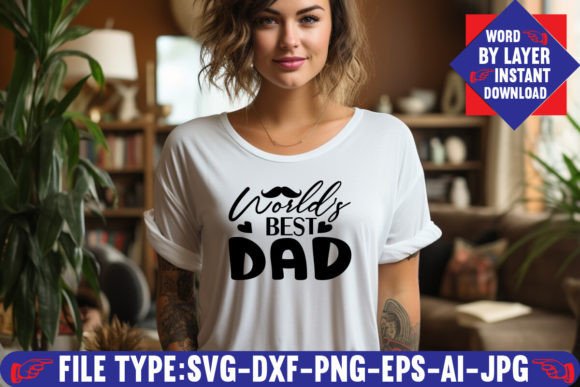
The download is delivered as a single .zip file containing six distinct file formats. Each format serves a specific role in the creative process, whether you are cutting vinyl, printing on transfer paper, editing the design in a vector application, or sharing a preview with a client. The six files are: one Adobe Illustrator (AI) source file, one layered SVG cut file, one PNG file at 300 DPI with a transparent background, one EPS editable vector file, one DXF file, and one JPEG. Having this range of formats means you can move between tools—from Cricut Design Space to Silhouette Studio to Adobe Photoshop—without having to convert or redraw the design.
The SVG file is the centerpiece for most cutting workflows. It is saved word by word in layers, which gives you control over how the text is assembled. You can isolate individual words, change their colors, resize them independently, or rearrange the layout before sending the design to your machine. This layered structure is what makes the World’s Best Dad SVG Design practical for real projects: you are not stuck with a single merged shape. You can treat each word as its own element, which is especially helpful when working with multi-color vinyl or when you want to apply different adhesive foils to different parts of the phrase.
How the Design Fits Into a Complete Creative Workflow
Whether you are a small business owner producing custom gifts, a hobbyist making items for family, or a freelancer delivering assets to a client, the World’s Best Dad SVG Design can be inserted at several points in your workflow. It works as a starting point, a middle-stage production file, or a final output asset, depending on your needs.
If you are planning a project from scratch, the design serves as the initial creative anchor. You can open the AI or EPS file in Adobe Illustrator to preview the layout, adjust the font if you want a different style, or add embellishments like a border, a heart, or a trophy icon. Because the file is layered, you can work on each word without affecting the others. This is useful if you want to scale “World’s” to fit a specific width while keeping “Best Dad” at a different size for visual balance. Once the layout is final, you export the SVG for your cutting machine or use the PNG for a print-and-cut workflow.
For those who are further along in their process—say, you already have a shirt design or a sign layout and just need a high-quality text element to drop in—the World’s Best Dad SVG Design acts as a plug-in asset. You can import the SVG directly into Cricut Design Space or Silhouette Studio, place it on your virtual mat, and adjust the size to match your substrate. The word-by-layer structure means you can assign different colors to each word in software, preview how the finished piece will look, and then cut each color separately if you are using layered vinyl. This saves time compared to manually creating layers from a flattened image.
After the cutting or printing is done, the design still has a role to play. The PNG file with a transparent background is ideal for mockups. You can overlay the design on a photo of a t-shirt, a mug, or a wooden sign to show the client or to preview for yourself. The high resolution (300 DPI) ensures the text looks crisp even at larger display sizes. This is especially useful for small business owners who need to produce product images for an online shop or a social media post.
Compatibility and Tool Integration
One of the practical strengths of this file package is that it works across multiple platforms without requiring additional converters or plugins. The SVG file is compatible with Cricut Design Space, Silhouette Studio (both basic and business editions), Inkscape, Adobe Illustrator, and Adobe Photoshop. The DXF file provides an alternative for users of certain cutting machines or CAD-like software that prefer that format. The EPS file works in most vector editors and can be opened in older versions of Adobe software as well.
If you are working primarily with a Cricut machine, the SVG format is the most straightforward choice. You upload the SVG directly into Design Space, and the layers appear as separate elements. You can then assign each layer to a different cut line, apply different colors for visual reference, and proceed to cut. Because the design is already optimized for cutting with clean paths and no unnecessary nodes, you avoid common issues like incomplete cuts or jagged edges.
For Silhouette users, the SVG or DXF format works well. Silhouette Studio handles SVG imports reliably, and the layered structure means you can use the “Release Compound Path” feature if needed to further break apart the words. The PNG file is also useful if you want to use the trace function to create your own cut lines, though the included SVG already gives you clean vector paths, so tracing is usually unnecessary.
If you are a graphic designer or a content creator who works in Adobe Illustrator or Photoshop, the AI source file gives you full access to the original vector artwork. You can edit the type, change the kerning, apply effects, or combine the design with other graphics. The EPS file serves as a fallback for opening in non-Adobe applications that support encapsulated PostScript. The JPEG file is the lowest-tech option, useful for quick previews, embedding in documents, or sending to a client who does not have vector software.
Practical Implementation Tips for Different Use Cases
Let’s walk through a few typical scenarios to see how the World’s Best Dad SVG Design fits into real work.
Scenario 1: Making a layered vinyl sign. You want to create a 12-inch by 6-inch wooden sign with the words in different colors: “World’s” in blue, “Best” in red, and “Dad” in black. Open the SVG in Cricut Design Space. Ungroup the layers. Select each word and assign a different color. For each color, cut a separate piece of vinyl. Weed the excess material, apply transfer tape, and layer the words onto the wooden board. Because the design is word-by-layer, you do not have to manually separate words or realign them on the mat. You simply cut each color in sequence and stack them.
Scenario 2: Printing heat transfer paper for a t-shirt. You want a single-color design on a white shirt. Open the PNG file in Photoshop or your preferred image editor. Resize it to fit the shirt. Because the PNG has a transparent background, you can place it directly on a mockup or print it onto heat transfer paper. If you need to mirror the image for certain transfer papers, the JPEG can be flipped easily. The 300 DPI resolution ensures the text remains sharp after pressing.
Scenario 3: Creating a digital card or invitation. Open the EPS file in Inkscape or Illustrator. Scale the design to fit your card size. Add decorative elements around the text—maybe a border of stars or a subtle background pattern. Export as a PDF for print. The vector format means you can scale the design to any size without losing quality, from a small greeting card to a large poster.
Scenario 4: Batch production for a small business. If you sell personalized gifts, you can keep the AI file as your master template. Each time you receive an order, open the file, adjust the colors or layout slightly if needed, and then export the SVG for your cutting machine. The consistency of the file structure means you can set up your machine once and run multiple orders with minimal rework. Over time, you can build a library of variations—different fonts, different word arrangements—starting from the original file.
Preparation, Organization, and Long-Term Use
Getting the most out of the World’s Best Dad SVG Design starts before you even unzip the folder. Create a dedicated folder on your computer for SVG projects, and inside it, create subfolders by holiday or theme. Place this design in a “Father’s Day” or “Dads” folder along with any other related assets. When you need it later—maybe next year or for a custom order—you will find it immediately without searching through dozens of downloads.
Because the file is digital-only, there is no risk of wear or damage. You can use it hundreds of times in different sizes, on different materials, and in different color combinations. The word-by-layer structure also makes it easy to modify. If you want to change “World’s Best Dad” to “World’s Best Grandpa,” you can edit the text in the AI file and resave the SVG. The original design serves as a starting point for a whole family of related projects.
Quality control is straightforward. Before cutting expensive vinyl or pressing a shirt, do a test cut on scrap material. The SVG paths are clean, but your machine’s calibration and blade condition also affect the result. The PNG file can be used as a visual reference to compare the cut result against the intended design. If the test cut looks good, proceed with your final material. If not, adjust your blade depth or pressure settings.
One observation worth noting: because the design is layered word by word, the SVG file size remains small and the paths are optimized for cutting. There are no extraneous shapes or hidden elements that slow down your software. This efficiency is especially noticeable when working on a slower computer or when loading multiple designs into a single project in Cricut Design Space.
Making the Design Work for You
The World’s Best Dad SVG Design is more than just a phrase. It is a complete set of assets designed to fit into a practical creative workflow, whether you are a seasoned maker or someone trying a cutting machine for the first time. By understanding what each file format is for, and by integrating the design into your preparation steps, your production sequence, and your finishing work, you save time, reduce frustration, and produce a result that looks professional. The layered structure gives you flexibility, the multiple formats give you compatibility, and the clean vector paths give you reliability. That combination is what turns a simple idea into a finished product you can be proud to give as a gift or sell to a customer.