Why Blue Star Pattern Digital Paper Deserves a Spot in Your Creative Toolkit
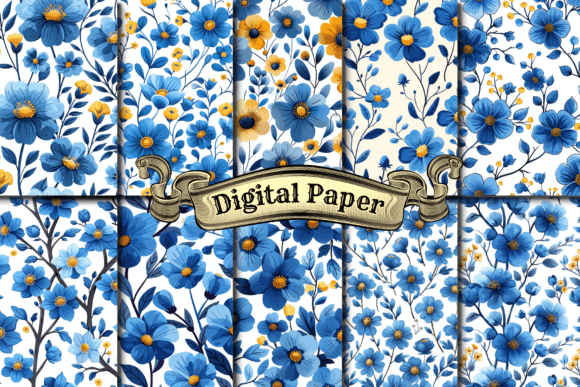
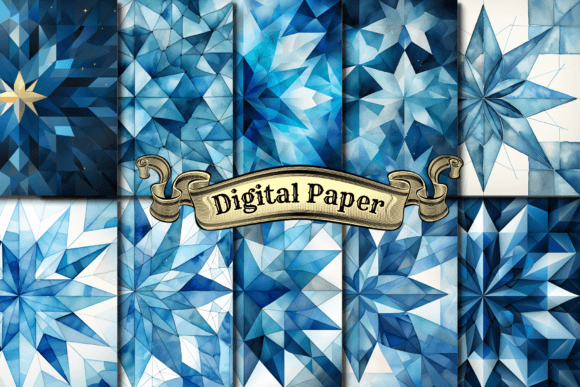
If you have been browsing pattern collections for print-on-demand, digital design, or craft projects, you have likely come across Blue Star Pattern Digital Paper. At first glance, it looks like a simple set of repeating star motifs in blue tones. But dismissing it as just another pretty pattern would be a mistake. This digital paper set—offered as 10 individual designs in both JPG and PNG formats, each measuring a generous 4000 x 4000 pixels—is built for versatility. It is equally at home in a Cricut project, a fabric print, a social media background, or a notebook cover. The question is not whether you can use it, but whether you are using it well.
Understanding what this paper is, what it is not, and how to avoid common pitfalls can save you time, money, and frustration. Whether you are a seasoned creator or just starting out, a few practical corrections can make the difference between a mediocre result and a polished product.
What Blue Star Pattern Digital Paper Actually Is (And What It Is Not)
This is a set of seamless, high-resolution digital files. Each pattern is designed to tile without visible seams, meaning you can repeat it across large surfaces—fabric, wallpaper, wrapping paper, website backgrounds—without awkward breaks. The 4000 x 4000 pixel resolution gives you print-ready quality at up to about 13 inches at 300 DPI. That matters more than most people realise.
A common misunderstanding is that digital paper is only for digital use. In reality, this set is equally suited for physical products. The PNG files support transparency, making them ideal for layered designs in Photoshop, Canva, or Affinity. The JPG files are smaller and easier to upload to print-on-demand platforms like Printful, Redbubble, or Amazon Merch. Knowing when to use each format is one of the first decisions that affects your final quality.
Another overlooked detail: these are individual pattern files, not a template or a mockup. You are buying the patterns themselves, not a pre-made product. That gives you freedom, but also responsibility. You need to apply them correctly to get professional results.
The Most Common Mistake: Ignoring File Format and Color Space
Many people download the JPG version and use it directly in their POD uploads without thinking about colour profile. If you are designing for print, RGB files can look vibrant on screen but dull or washed out on fabric or paper. This is especially true for blue tones, which can shift noticeably between digital and physical output.
If you are using Blue Star Pattern Digital Paper for print-on-demand products, check whether your platform expects RGB or CMYK. Most POD services convert files automatically, but the conversion is rarely perfect. A better approach: open the PNG versions in an editor that supports colour management, convert to CMYK manually, and soft-proof before you upload. The extra five minutes can mean the difference between a navy that pops and a navy that looks like faded denim.
Similarly, if you are using the PNG files for layered designs in a cutting machine like Cricut or Silhouette, ensure you are importing the file with its transparency intact. A common error is to open the JPG instead, which has a solid background, and then struggle to remove it manually. The PNG is your friend here—use it.
Overlooking Resolution and Scaling
Because each pattern is 4000 x 4000 pixels, people assume it will work at any size. That is partly true, but only if you scale correctly. If you stretch the pattern too large in a design program, the stars become blurry or pixelated. If you shrink it too much, the pattern becomes too dense to see clearly.
A practical rule of thumb: for a standard 8.5 x 11 inch print, you can use the pattern at full resolution without any scaling. For a 24 x 36 inch poster, you may want to scale it down to 50% or less so the stars remain sharp at viewing distance. For a phone case, which is small, you might scale the pattern up slightly to make the stars more prominent. Always test a small section first. Most design programs let you preview at actual print size—use that feature.
Another mistake: cropping the pattern unevenly. If you crop a seamless repeating pattern in the middle of a star, the repeat will look broken when you tile it for fabric or wallpaper. Instead, either use the full pattern or crop at the natural seam boundaries. If you cannot see where the seams are, open the file and look for repeating elements. The set is designed to tile, but only if you respect its geometry.
Underestimating Commercial Use and Licensing
One of the most frequently overlooked aspects of buying digital paper is what you are actually allowed to do with it. Many creators assume that because they purchased a set, they can use it anywhere, on any product, in any quantity. That is not always the case.
For Blue Star Pattern Digital Paper, you need to check the license included with your purchase. Most high-quality digital paper sets allow personal and small-scale commercial use, but may restrict mass production or redistribution. If you are planning to sell thousands of units on a POD site, you may need an extended license. This is not a scare tactic—it is a real issue that affects small business owners who later face takedown notices or account suspension.
Better approach: read the license before you buy. If the product page does not clearly state terms, contact the seller. Keep a copy of your receipt and the license terms. If you are a freelancer or designer, also clarify whether you can transfer the license to a client. Some licenses are per-user, which means your client cannot use the same pattern without buying their own copy. Avoiding this misunderstanding upfront saves headaches later.
Using the Wrong Pattern for the Wrong Product
Not every pattern works well on every product. A dense star pattern that looks beautiful on a notebook cover may look chaotic on a T-shirt. A pattern with very fine details may lose definition when printed on a low-resolution mug or a textured fabric.
With Blue Star Pattern Digital Paper, you have 10 different designs. Some are likely more detailed, others more minimal. Before you commit to a product, print a test sample or use a digital mockup. If you are using a POD service that offers a mockup generator, upload the pattern and zoom in. Ask yourself: does the star motif read clearly? Is the contrast high enough? Will the blue tones look good against the product background?
For fabric prints, consider the repeat size. A pattern that looks great at 12 inches wide may look too busy on a 4-inch wide piece of fabric. Most POD platforms let you specify the repeat size—adjust it so the stars are proportionate to the product. A good starting point is to set the pattern at about 3–5 inches in diameter for apparel, and slightly larger for home decor.
Neglecting Metadata and File Organization
This sounds like a small detail, but it affects efficiency. The set includes 10 JPG and 10 PNG files, which means 20 files total. If you are a busy creator juggling multiple projects, keeping them organised matters. Many people download the files and never rename them, then spend ten minutes searching for the right pattern later.
Better practice: immediately after downloading, rename each file with a descriptive title and the format. For example, "Blue-Star-Pattern-01-Light-Navy-PNG.png" instead of "pattern_01.png". If you are using a digital asset management tool or even just a folder system, sort by colour, style, or intended use. This small investment of time pays off every time you need to find a specific design.
Also, back up your files. Digital paper sets are often sold as one-time downloads. If you lose them, you may not be able to get them back without repurchasing. Store copies on an external drive or cloud storage. If you are using the patterns for client work, keep a separate folder per client with license details included.
Ignoring Colour Consistency Across Products
If you are building a brand or a product line using Blue Star Pattern Digital Paper, colour consistency matters. The same pattern can look different on a glossy phone case versus a matte notebook versus a cotton T-shirt. This is not a flaw in the pattern—it is a characteristic of the substrate and printing process.
To manage this, create a small colour reference sheet. Print the pattern on several common substrates you use, and note how the blue shifts. If you are selling on multiple platforms, check each platform’s colour profile. Some POD services offer ICC profiles for download. Use them. If you cannot get a perfect match, choose one primary product type and adjust the pattern file specifically for that product. Consistency across your shop builds trust with customers.
If you are using the pattern for social media or website backgrounds, colour consistency is simpler because you are working in RGB. But even then, different monitors display colours differently. Calibrate your screen if possible, or at least view your design on multiple devices before publishing.
Practical Advice for First-Time Users
If you are new to digital paper, start small. Pick one pattern and one product. Upload the PNG version to Canva or Photoshop, place it on a product mockup, and see how it feels. Experiment with scale, rotation, and layering. Once you are comfortable, branch out to other patterns and products.
For Cricut or Silhouette users, remember that Blue Star Pattern Digital Paper works best as a background or decorative element. You can print and cut the pattern to create stickers, labels, or card fronts. Use the PNG version for print-then-cut projects so your machine recognises the cut line. If you are applying the pattern to a 3D object like a mug or a bag, use the JPG version and resize it to fit the template provided by your manufacturer.
For POD sellers, test one product at a time. Upload the pattern to a single product category—like tote bags—and see how sales go before expanding to mugs, shirts, and notebooks. This approach lets you refine your product images and descriptions without overwhelming yourself.
What to Check Before You Buy
Before purchasing Blue Star Pattern Digital Paper, confirm the following: the resolution is high enough for your intended use (4000 x 4000 px is excellent for most projects), the file formats are compatible with your software, and the license covers your commercial needs. If the listing does not specify whether it includes PNG with transparency or only JPG, ask. If the sample images show the patterns at full size, study them carefully. Look for repeating seams, colour banding, or pixelation. High-quality digital paper should look clean at full zoom.
Also, consider the colour palette. The blue tones in this set range likely from pale sky to deep navy. If your projects require warm tones or neutrals, this set may not be the best fit. But if you work with cool colours, blue-themed branding, or star motifs, this is a strong choice.
Finally, think about your workflow. If you edit on a mobile device, ensure your app supports high-resolution PNG files. If you work primarily on desktop, check that your software can handle 4000 px files without lag. Most modern programs can, but older machines may struggle. If performance is an issue, use the JPG versions, which are smaller, and resize them during editing.
The Opportunity in Everyday Patterns
Blue Star Pattern Digital Paper is not a revolutionary product that will change your business overnight. But it is a reliable, well-designed tool that, when used correctly, can elevate your products and streamline your creative process. The difference between someone who gets great results and someone who struggles often comes down to small decisions: choosing the right file format, respecting the repeat, checking the license, and testing before committing.
By avoiding the common mistakes outlined here, you set yourself up for smoother workflows, better-quality products, and fewer disappointments. Whether you are a hobbyist making a single notebook or an entrepreneur launching a full product line, the advice is the same: understand what you have, use it deliberately, and always test before you publish.