Why an Office White Blank Wall Is a Creative Tool
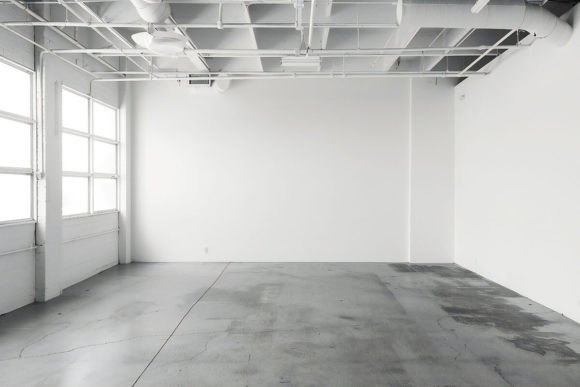
For anyone who works visually, a blank white wall can feel like either a limitation or a liberating resource. The Office White Blank Wall asset—a 6000 x 4000px, 3000dpi JPG of an industrial open-plan workspace—falls squarely into the second category. It is not just a texture; it is an environment waiting to be activated. This article explores its practical uses for designers, marketers, and business owners who need a clean, scalable foundation for their work.
What Makes This Specific White Wall Different
The difference between a generic white background and the Office White Blank Wall comes down to resolution, lighting, and context. At 6000 x 4000 pixels, this file provides ample real estate for high-resolution prints or detailed digital composites. The 3000dpi ensures sharpness, while the industrial open-space setting introduces natural, diffused lighting and subtle architectural shadows.
This prevents the sterile, flat look that often plagues artificially created white backgrounds. The surface retains a faint grain and depth, making it feel like a real space. That authenticity adds subconscious credibility to anything you place within it, whether you are building a product mockup, a virtual set, or a minimalist brand presentation.
Transforming the Space: Core Applications
A high-resolution industrial white wall is surprisingly versatile. Here are the primary ways different professionals integrate it into their workflow.
E-Commerce and Product Photography
If you are a small business owner or marketer, hiring a studio for product shots is expensive. The Office White Blank Wall offers a cost-effective alternative that does not sacrifice quality. By placing your products—whether tech gadgets, skincare bottles, or handmade goods—in front of this clean background, you achieve a consistent, professional look. The subtle depth from the industrial setting helps products stand out without competing for attention. For best results, match the neutral lighting of the environment to your product's key features.
Branding and Mockup Presentations
Designers can use the wall to present logos, signage, or app interfaces in a real-world context. Instead of showing a flat logo on a white square, place it on the wall. It immediately gives the client a sense of scale and physical presence. This is particularly effective for architecture firms, tech startups, or creative agencies pitching a comprehensive visual identity. The widescreen aspect ratio of the 6000 x 4000px file allows for cinematic framing of your mockups.
Content Creation and Virtual Environments
Entrepreneurs and educators often need a clean, professional backdrop for video calls or recorded content. Using the Office White Blank Wall as a virtual background creates a focused, minimalist aesthetic. It suggests openness and clarity. For bloggers and social media creators, the wall serves as an excellent base for flat lays, quote graphics, or layered storytelling visuals. The high resolution holds up well when cropped for different social media formats.
Creative Approaches and Styling Variations
Once you understand the base properties of the file, you can push it into different creative directions without losing its core utility.
The Minimalist Method
Embrace the negative space. Let the white wall dominate the frame, placing your subject in the center or on a strong compositional grid. This approach works well for luxury brands, modern art concepts, or any project aiming for a calm, uncluttered feel. The high resolution ensures that even large areas of white retain enough detail and subtle texture to avoid looking like a digital void.
Industrial Contrast
Introduce elements that contrast with the clean white surface. Think raw wooden textures, black metal furniture, or vibrant green plants. The open-space context of the original photo provides a structural guide for adding these elements. You can build a scene that feels both sterile and organic, minimal and warm.
Light and Shadow Play
Because the base image captures a real industrial space, the existing lighting can be matched or extended. Creators can composite new light rays, shadows, or reflections that interact with the original environment. This leads to highly realistic digital art or architectural visualizations. Aspiring photographers can use the file as a virtual studio to practice lighting setups. By dropping a product cutout into the scene, you can experiment with shadow placement and intensity without needing a physical studio.
Practical Guidance for Different Creative Goals
How you adapt the Office White Blank Wall depends on your specific workflow. Here is how different users can get the most out of it.
For Marketers and Small Business Owners
Focus on consistency. Use this background for an entire product line to establish a cohesive visual brand. Download the file, create a few lighting presets in your editing software, and stick to a composition template. This builds brand recognition and saves time on post-production. Ensure your product pricing or marketing message aligns with the clean, modern vibe of the space.
For Designers and Architects
Use the wall as a reference material or a base for mood boards. Its realistic scale helps in visualizing how materials react to light. It can be a stand-in for a client's actual space during the early stages of a project. Keep your layers organized by using this file as the bottom layer in your composites, adjusting the opacity to match ambient lighting conditions of other elements.
For Freelancers and Hobbyists
Experimentation is key. Use the wall as a canvas for digital projection mapping or typographic art. Because it represents a real industrial space, adding fantasy or surreal elements creates an interesting tension. The key is to let the realistic base ground your creative leaps. The 4Mb file size and 3000dpi resolution provide enough data for heavy manipulation without losing image integrity.
For Educators and Course Creators
A clean background is essential for reducing cognitive load on students. Use the white wall as a backdrop for infographics, charts, or recorded lectures. The industrial context adds a subtle level of professionalism without introducing distracting elements. You can use the file to create consistent thumbnails for an entire course series, helping learners quickly identify your content.
Maintaining Quality and Consistency
To keep your projects looking professional, pay attention to the details of the original file. Avoid over-processing the highlights, as the white balance is calibrated for the industrial setting. When adding text or graphics, ensure they respect the perspective and depth of the environment.
- Organize your assets: Rename the file intuitively and store it in a dedicated “Backgrounds” or “Textures” folder.
- Tag it properly: Use keywords like “office,” “white wall,” “industrial,” and “open space” to make it easy to find later.
- Match your lighting: When compositing, adjust your subject’s exposure and shadow softness to match the diffused light of the industrial space.
- Respect the resolution: Take advantage of the 6000 x 4000px canvas. Do not scale the background down too aggressively if you plan to print or zoom in.
Remember that the best results come from treating the background as an active participant in the composition, not just a passive backdrop.
The Office White Blank Wall is more than a stock photo. It is a foundational tool for creative problem-solving. Whether you are building a brand identity, showcasing a product, or teaching an online course, this high-resolution, industrial space provides a versatile and professional stage. By understanding its properties and translating them into your specific workflow, you can save time, elevate your visual output, and maintain a consistently high standard of work. Download the file, open your editing software, and treat the wall as the collaborator it is.