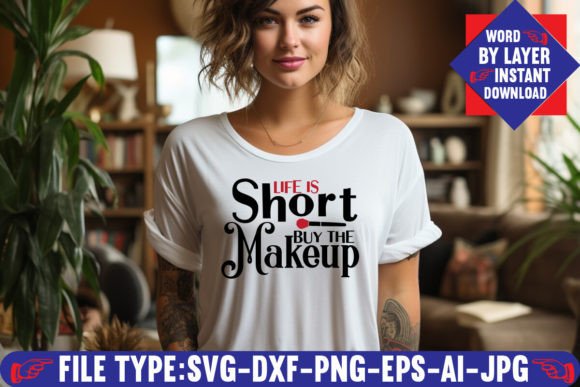
Life is Short Buy the Makeup SVG Design
There is a phrase that circulates among creators, small business owners, and makeup lovers that resonates deeply: Life is Short Buy the Makeup. It captures a sentiment many of us feel — that life is too brief to skip the things that bring joy, color, and self-expression. The Life is Short Buy the Makeup SVG Design translates that playful motto into a versatile digital file you can use for T-shirts, mugs, tumblers, stickers, wall art, and more.
But here is where many people stumble: they see the phrase, love the idea, and download the file without fully understanding what they are getting or how to use it. The result can be wasted time, frustration, or a ruined project. Let us walk through what this design actually includes, where people commonly go wrong, and how you can avoid those mistakes so your finished product looks exactly as you imagined.
What the Life is Short Buy the Makeup SVG Design Actually Includes
When you purchase this design, you do not receive a physical item. There will be no package in the mail, no printed vinyl, and no premade shirt. What you get is a digital download — a single .zip file that contains six individual files, each designed for a specific purpose or software environment.
Your download includes:
- 1 AI File — Adobe Illustrator source file, fully editable
- 1 SVG File — Word-by-layer SVG cut file
- 1 PNG File — 300 DPI with transparent background
- 1 EPS File — Editable vector file
- 1 DXF File — Compatible with many cutting machine programs
- 1 JPEG File — Standard image format
These files are compatible with Cricut, Silhouette, Inkscape, Adobe Photoshop, and Adobe Illustrator.
The phrase Life is Short Buy the Makeup is delivered as a word-by-layer SVG, meaning each word or group of words sits on its own layer. This is important because it gives you control over colors, sizes, and placement when you cut or print.
Common Mistake #1: Not Understanding What a Digital Download Means
One of the most frequent misunderstandings we see is people expecting a physical product. They purchase the design, wait for delivery, and then feel confused when they receive a link to a zip file instead of a shirt or a sticker sheet.
This confusion can lead to frustration, negative reviews, or abandoned projects. If you expected a ready-to-wear item, the digital file feels like nothing at all. But for creators and small business owners, the digital file is actually more valuable — it gives you complete freedom to produce the item exactly how you want it, on your choice of material, in your preferred size and color.
What to check before you proceed: Make sure you have the appropriate software or a cutting machine that can handle one of the included file types. If you own a Cricut, the SVG file is your go-to. If you use Silhouette Studio, the DXF or SVG will work. If you design from scratch in Adobe Illustrator, the AI file gives you full editing power.
Common Mistake #2: Assuming One File Works for Everything
Another oversight is thinking that one file format covers all use cases. Some people open the JPEG and try to cut it with their Cricut, only to find that JPEGs are raster images with no cut lines. Others try to use the PNG for a layered vinyl project and wonder why the background is missing.
Each file in the download has a specific job:
- SVG is for cutting machines — it contains vector paths that the machine can follow.
- PNG is for printing — it has a transparent background and works well for digital mockups, print-on-demand, or sublimation.
- EPS and AI are for editing — you can modify the design, change colors, or add effects.
- DXF is a fallback for older software or specific machine imports.
- JPEG is for quick previews or simple use where transparency is not needed.
Using the wrong format can result in a cut that fails, a design that pixelates, or layers that do not align. Take a moment to match the file to your project. If you are cutting vinyl, use the SVG. If you are printing a sticker, use the PNG at 300 DPI.
Common Mistake #3: Ignoring the Word-by-Layer Structure
The Life is Short Buy the Makeup design is delivered as a word-by-layer SVG. That means the words Life, is, Short, Buy, the, and Makeup are each on separate layers. Some people open the file, see multiple layers, and think something is broken or that the design is incomplete.
In reality, this structure is a powerful feature. It allows you to:
- Assign different vinyl colors to each word
- Respace or rearrange words
- Hide certain words if you want a shorter version
- Adjust individual word sizes without affecting the whole design
If you ignore the layers and treat the design as a single flat image, you lose the flexibility that makes the SVG valuable. Take a few minutes to learn how your software handles layers. In Cricut Design Space, you can ungroup the file to see each word. In Silhouette Studio, you can release the compound path. Once you do, the entire design becomes customizable.
Common Mistake #4: Overlooking the Importance of 300 DPI
The PNG file in your download is labeled as 300 DPI. That matters more than many people realize. DPI stands for dots per inch, and 300 is the standard for print quality. If you use the PNG for a sublimation transfer, a sticker, or any printed product, the high resolution ensures the text looks crisp and professional.
A common mistake is resizing the PNG in a way that drops its effective DPI. For example, if you open the PNG in a basic image editor and stretch it to 200% of its original size, the DPI drops to 150 and the edges of the text will appear soft or jagged. This is especially noticeable with small lettering or script fonts.
Practical advice: Use the PNG at or near its original size. If you need a larger version, consider using the SVG or EPS instead — vector files can scale to any size without losing quality. Keep the PNG for projects where the size matches your output needs.
Common Mistake #5: Not Checking Software Compatibility Ahead of Time
The design is advertised as compatible with Cricut, Silhouette, Inkscape, Photoshop, and Illustrator. But not every version of every program handles SVG files the same way. Some free SVG viewers do not support layered files. Older versions of Silhouette Studio may require a DXF instead of an SVG. And if you are using a phone app like Cricut Design Space on a tablet, the import process can behave differently than on a desktop.
We recommend doing a quick compatibility check before you start your project. Open the SVG in your software of choice and verify that all layers are present and that the design looks correct. If you run into issues, try the DXF or EPS as a backup. If you are using Inkscape, the SVG will work natively, but you may need to ungroup the layers manually.
For beginners, the safest approach is to start with the SVG file in the software that came with your cutting machine. That is typically the path with the fewest surprises.
Common Mistake #6: Forgetting to Secure Your Download Immediately
Digital downloads are convenient, but they can also be easy to misplace. Some people download the zip file, open it to check the contents, and then forget to save it to a safe location. Weeks later, when they are ready to use the design, they cannot find the file and need to search through emails or order histories.
This is more than a minor inconvenience — some sellers have a limited window for downloading purchases, and if you miss the window, you may have to contact customer support or repurchase the design.
A better approach: As soon as you download the zip file, move it to a dedicated folder on your computer or cloud storage. Name the folder clearly — something like SVG Downloads — Life is Short — so you can find it later. Inside the folder, consider extracting the files so you can see each format at a glance. This small habit saves time and prevents frustration down the road.
Common Mistake #7: Not Checking the Design Scale Before Cutting
When you open the SVG in your cutting software, the design may appear at a default size that does not match your project. Some people assume the size is correct for a standard mug or T-shirt and proceed to cut, only to find that the words are too large or too small for their surface.
Always check the dimensions before you cut. For a standard 11-ounce mug, the design should be roughly 8 to 9 inches wide if wrapping around the full surface. For a T-shirt pocket area, you may want the design to be 4 to 5 inches wide. For a decal on a laptop, 3 to 4 inches might be ideal.
Resize the design in your software, keeping the proportions locked so the text does not get distorted. The word-by-layer structure makes it easy to adjust each word individually if needed, but for most projects, scaling the entire group works well.
Common Mistake #8: Assuming the Design Is Suitable for Commercial Use Without Checking
This is a detail that many buyers overlook. Some SVG files come with a commercial use license that allows you to sell finished products, while others are strictly for personal use. The Life is Short Buy the Makeup SVG Design is typically sold for personal use, and commercial rights depend on the specific seller and their terms.
If you plan to use the design on products you sell — at a craft fair, on Etsy, or through print-on-demand — you need to verify the license. Contact the seller, read the product description carefully, or look for a separate commercial license option. Selling a design without the proper rights can lead to takedown notices, loss of revenue, or legal issues.
Our advice: treat every design as personal use until you confirm otherwise. If commercial use is important to you, factor that into your purchase decision and be willing to pay a little more for a licensed version.
Common Mistake #9: Overcomplicating the Weeding Process
Weeding — the step where you remove excess vinyl from the design — can be intimidating for beginners, especially with a design that includes multiple words and potential small details. Some people avoid the layered approach entirely because they think it will be too tedious.
With a word-by-layer SVG, you have the option to cut each color separately, which actually simplifies weeding. Each word is isolated, so you only need to weed the area around that one word. There is no complex overlapping or tiny islands of vinyl to deal with. The design is intentionally structured to make the process straightforward.
If you have a Cricut or Silhouette, use transfer tape to layer the words onto your final surface. Work from the bottom layer up — typically the largest or longest word first — and use alignment marks or a grid mat to keep everything straight. The result will look professional, and the layer-by-layer approach gives you a clean, crisp final product.
Final Thoughts on Using the Life is Short Buy the Makeup SVG Design
The Life is Short Buy the Makeup SVG Design is a fun, versatile digital file that can be used in countless ways once you know how to handle it correctly. The most common issues — confusion over file formats, ignoring the layer structure, scaling errors, and licensing oversights — are all avoidable with a little upfront attention.
Before you open the zip file, take five minutes to think about your project, your software, and your end goal. If you are cutting vinyl, use the SVG. If you are printing, use the PNG. If you are editing, use the AI or EPS. Keep your downloaded files organized, check your dimensions, and confirm any commercial licenses if you plan to sell finished products.
When you approach the design with this mindset, you eliminate almost all the frustration that people encounter. The creative process becomes what it should be — enjoyable, satisfying, and worth the effort. Life may be short, but with the right preparation, you can make something beautiful with this design and have fun doing it.