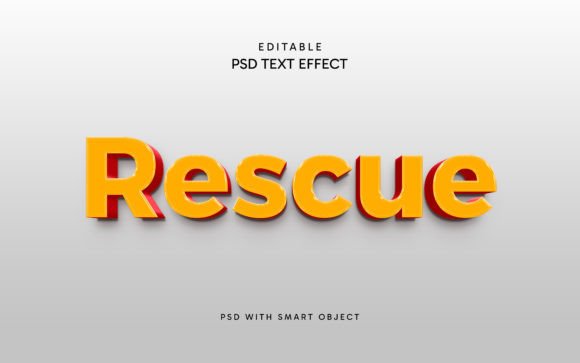
Editable Rescue Text Style Effect
Typography can make or break a design. A strong text treatment draws the eye, sets a mood, and communicates value before a single word is read. For designers, marketers, and content creators, finding a text effect that is both high-quality and genuinely easy to customize is rare. The Editable Rescue Text Style Effect offers exactly that combination—a polished, rescue-inspired aesthetic that can be applied quickly, edited without hassle, and adapted across a wide range of projects. Whether you are designing a social media banner, a product label, or a presentation slide, this resource gives you a head start without compromising on creative control.
What Makes This Text Effect Different
Many text effects on the market promise ease of use but require hours of layer adjustments or technical know-how. The Editable Rescue Text Style Effect is built around a simple, practical workflow. The file arrives as a layered PSD with a smart object named “Your Text.” You double-click that smart object, replace the placeholder text with your own, save the changes, and the effect updates across the main file automatically. This process eliminates the need to rebuild layer styles, shadows, gradients, or textures from scratch. Everything remains fully editable, so you are never locked into a single look.
The file comes in a resolution of 4000 by 2500 pixels, which is generous enough for both print and screen use. The layers are organized into folders, keeping the structure clean and easy to navigate. No advanced Photoshop skills are required—if you can double-click and type, you can apply this effect. This accessibility makes it a practical tool for experienced designers who want to move faster, as well as for entrepreneurs or bloggers who handle their own visuals without a dedicated design background.
Creative Projects That Benefit from a Rescue Text Style
The rescue theme carries connotations of urgency, reliability, and action. A text effect that incorporates distressed textures, bold outlines, or worn edges can convey durability and grit. It works well for projects that need to feel grounded, tough, or service-oriented. Here are several applications where this style naturally fits.
Promotional Banners and Social Media Covers
Facebook covers, YouTube banners, and Twitter headers are often the first thing a visitor notices. A rescue-inspired text effect can help a call-to-action stand out, especially for channels related to emergency services, outdoor adventure, automotive repair, or community support. The distressed or rugged look of the text communicates that you mean business. You can pair the effect with a solid background image—like a truck, a forest, or a city skyline—and the text will hold its own without getting lost.
Poster and Flyer Design
Posters for charity runs, safety workshops, fundraising events, or outdoor gear sales benefit from typography that feels robust. The Editable Rescue Text Style Effect gives posters a consistent, professional look without requiring hours of manual texturing. You can adjust the colors to match your brand and swap the message in seconds. This makes it especially useful for small teams that need to produce multiple versions of a flyer for different events or audiences.
T-Shirt and Apparel Graphics
Apparel designs often rely on strong text treatments that print well on fabric. The rescue effect, with its layered details and textured finish, translates nicely onto t-shirts, hoodies, and caps. Because the effect is built at high resolution, you can scale it up or down without losing quality. For designers building a merchandise line for a brand, club, or cause, this resource saves time while maintaining a cohesive style across products.
Logo Presentations and Brand Mockups
When pitching a logo concept to a client, presenting the mark in a styled environment helps them visualize the final result. The Editable Rescue Text Style Effect can be used to present wordmarks or taglines within a mood board or mockup. The rescue aesthetic works especially well for brands in construction, outdoor equipment, emergency preparedness, or any industry that values strength and reliability. You can show the client a realistic preview without spending extra time on texturing or shading.
Greeting Cards and Plaques
For printed goods like greeting cards, thank-you notes, or wall plaques, a rescue-style text effect adds character. It gives the typography a handcrafted feel that stands out from standard digital fonts. You can customize the message for each occasion and output the file at full resolution for print. The effect works just as well on a small card as it does on a large poster, making it versatile for both personal and commercial projects.
Tailoring the Effect for Different Audiences and Platforms
One of the strengths of a well-built PSD resource is how easily it can be adapted to different contexts. The Editable Rescue Text Style Effect is no exception. Here are practical ways to adjust it for specific goals and audiences.
Adjusting Color for Brand Consistency
The smart object structure allows you to change the text content and color without breaking the effect. If your brand uses a specific shade of orange, green, or blue, you can apply it directly. For a more muted, professional look, desaturate the colors slightly. For a bolder, more urgent feel, increase contrast. This flexibility means the same effect can serve a nonprofit fundraising campaign one week and a commercial product launch the next.
Resizing for Different Formats
Because the source file is 4000 pixels wide, you have plenty of room to crop or scale down for specific platforms. You can create a square version for Instagram, a wide version for YouTube, and a vertical version for a flyer—all from the same PSD. Keep the text layer smart so you can update the message across all formats without redoing the effect each time.
Combining with Other Design Elements
The rescue text effect works well alongside icons, badges, and borders. You can add a thin stroke outline, a shadow, or a subtle texture overlay to tie the whole composition together. Because the PSD layers are organized, you can insert new elements without disturbing the text effect. This makes it easier to build a complete layout—whether for a website hero section or a product label—while keeping the typography as the focal point.
Targeting Specific Audiences
The same text effect can be positioned differently depending on who you are speaking to. For a younger, adventure-focused audience, pair the effect with vibrant imagery and dynamic compositions. For a more corporate or industrial audience, use muted tones, clean backgrounds, and minimal supporting graphics. The rescue style itself is neutral enough to adapt, while the boldness of the text effect ensures it remains readable and memorable.
Practical Tips for Getting the Most Out of the Effect
Working with a pre-built text effect should save time, not complicate your workflow. Keep these points in mind to maintain quality and consistency across your projects.
Always Edit the Smart Object
The easiest way to break the effect is to try to edit the text directly on the main canvas. Always double-click the smart object named “Your Text,” make your changes inside that tab, and save. This preserves the layer styles, textures, and transformations that create the rescue look. If you need to adjust the effect itself—like changing the shadow distance or the texture intensity—you can modify the layers in the main file, but leave the smart object intact for the text content.
Keep a Backup of the Original
Before you start customizing, duplicate the PSD file and store the original. This ensures you can always return to a clean version if you make experimental changes that don’t work out. It also gives you a template for future projects. Over time, you may develop a library of variations based on the same core effect.
Test on Backgrounds Before Finalizing
The rescue text style includes textures and shadows that interact differently with light and dark backgrounds. Place your text over the background you intend to use and check that it remains legible. If the effect gets lost, adjust the contrast or add a simple drop shadow in the main file. A quick test at this stage prevents printing or publishing a design that looks muddy.
Use the Effect as a Starting Point
The Editable Rescue Text Style Effect is a strong foundation, but you are not limited to what comes out of the box. Experiment with blending modes, add grunge overlays, or combine the effect with other layer styles to create a unique variation. Because the file is fully editable, you can evolve the look without starting from scratch. The rescue aesthetic can be softened, brightened, or aged further depending on your project needs.
Why This Approach Works for Creators and Business Owners
For freelancers, small business owners, and content creators, time is a scarce resource. Spending hours on text effects for every social media post, flyer, or product mockup is not sustainable. Having a reliable, editable resource like this one lets you produce professional-quality work consistently. It also reduces the barrier to entry for those who do not have advanced Photoshop training. You can focus on the message and the overall composition instead of wrestling with gradients and mask layers.
For educators, hobbyists, and publishers, the rescue text style offers a way to create visually engaging materials without a steep learning curve. You can produce posters for workshops, covers for publications, or illustrations for blog posts with confidence that the typography will look intentional and polished.
Maintaining Consistency Across a Campaign
When you use the same text effect across multiple assets—a poster, a social media banner, and a website header—your audience gets a cohesive visual experience. The rescue style becomes a recognizable element of your brand or campaign. Because you can edit the text quickly, you can produce variations for different offers, events, or languages while keeping the look consistent. This builds trust and makes your materials more professional at a glance.
Final Thoughts on Working with a Rescue Text Effect
The Editable Rescue Text Style Effect is more than a preset—it is a tool that balances speed, quality, and creative freedom. Whether you are designing a one-off poster or building a full campaign, the ability to replace text through a smart object, adjust colors, and output at high resolution gives you control without the overhead. The rescue aesthetic itself is versatile, fitting everything from rugged outdoor brands to community-focused organizations.
By understanding how to edit, adapt, and combine the effect with other elements, you can create original work that feels fresh and intentional. The best design resources are the ones that disappear into your workflow, letting you focus on the bigger picture. This text effect does exactly that—it delivers a strong visual punch with minimal friction, so you can spend your energy on the ideas, the layout, and the message that matters to your audience.