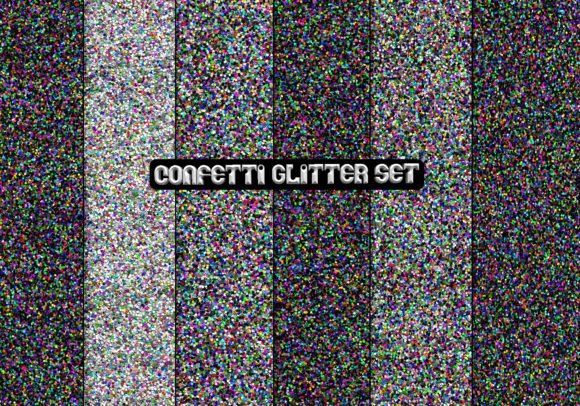
Confetti Glitter Set Paper Pack: Elevate Your Crafts Without the Common Pitfalls
The Confetti Glitter Set Paper Pack promises to infuse your projects with festive sparkle, but even the best digital asset can lead to frustration if you overlook a few key details. Whether you’re designing party invitations, scrapbook pages, or marketing materials, understanding what’s inside and how to use it correctly makes all the difference. Let’s walk through the most frequent mistakes people make with paper packs like this one—and how to sidestep them effortlessly.
Mistake #1: Assuming All Digital Papers Are Print-Ready Without Checking Specifications
It’s easy to assume any JPG file will print beautifully, but the Confetti Glitter Set Paper Pack comes with specific specs that matter. At 300 dpi and 2222 pixels per file, this pack is optimized for high-quality printing. Yet many users unknowingly resize these images for small projects or downscale them for screens, which can reduce the sharpness of the glitter effect. The resolution is ideal for cards, gift tags, and small posters—but not for large banners or billboards. Before you print, confirm that your editing software respects the original DPI. If you need to scale up, do so carefully, as stretching a 7.4-inch image at 300 dpi beyond its size will soften the details and make the sparkle look muddy.
Mistake #2: Confusing JPG Files with Transparent Background Needs
One of the most common misunderstandings is expecting a transparent background from a JPG. The six files in this pack are all JPG, which means each has a solid white or colored background—there’s no alpha channel. If you plan to layer glitter over dark backgrounds or composite elements, you’ll need to manually cut out the edges, which can be tricky with intricate confetti shapes. To avoid frustration, use these papers as full backgrounds, photo mats, or accent layers where the white edge becomes part of your design. For projects requiring transparent overlays, consider converting to PNG in your editing software, but be aware that the white areas may need manual removal. Better yet, plan your layout around the paper’s natural shape.
Mistake #3: Overlooking the Zipped Format and File Management
Receiving six files inside a single zipped folder is convenient, but many beginners click on the zip file without extracting the contents, then wonder why they can’t open the images directly in their design tool. Always unzip the folder first to a location you can easily navigate. Another oversight: not renaming the files before use. While the original names may be generic, renaming them to match your project layers saves time later. Organize your digital downloads by event or color scheme so you can reuse the pack efficiently. Small habits like these prevent the “I know I have that exact confetti somewhere” panic during a tight deadline.
Mistake #4: Forgetting the Printed Glitter Effect Is Illusion, Not Texture
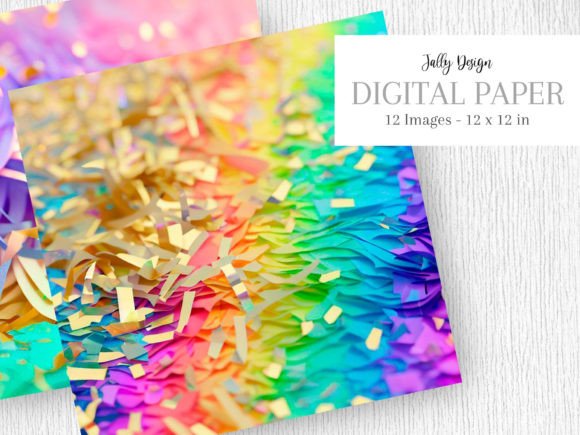
The Confetti Glitter Set Paper Pack creates a beautiful shimmer on screen, but printed on standard matte paper, the glitter effect loses its luster. Many people expect actual metallic or holographic shine from the printout itself. The pack works best when printed on glossy photo paper, cardstock with a sheen, or with a laser printer that amplifies contrast. If you use matte paper, the dust-like specks may appear flat. A smart approach: make a small test print on different papers before committing to 50 invitations. You can also add a thin layer of clear UV coating or glitter spray to mimic the real thing—but for most crafters, a high-gloss paper setting already does the trick.
Mistake #5: Ignoring Color Calibration Across Devices
What looks like vibrant party pink on your monitor can come out muted or orange on your printed sheet. The JPG files use sRGB color space, which is standard for web and most consumer printers. However, if your screen is uncalibrated, you’ll make edits that look correct to you but print incorrectly. Similarly, professional printing services may use CMYK, so converting the files yourself beforehand prevents surprise color shifts. Always download a small preview if available, or use a soft-proofing tool in Photoshop or GIMP to simulate the final output. The six papers in this pack were designed to coordinate, but if you mix them with other sources, ensure both are in the same color profile to avoid clashing tones.
Mistake #6: Buying Without Considering the Specific Use Case
This pack is fantastic for birthday decorations, congratulations cards, and New Year’s projects, but it may not suit every theme. Some buyers grab it for a formal wedding invite only to find the confetti pattern too casual. Others assume the pack is for digital scrapbooking, forgetting that JPG files are not layered like a scrapbooking kit. The six files include subtle variations—some denser in confetti, others more sparse. Know your project beforehand. If you need a single seamless tile for a large background, check the dimensions and repeat pattern behavior. The pack works beautifully as an accent paper, but covering a whole room in a repeating wallpaper might require more files or a different design.
Practical Steps for First-Time Users
Before you start, unzip the folder and open each JPG to preview color and density. Then select a small test area—like a 4x6 card—and print it on your chosen paper. Adjust brightness, contrast, or saturation based on that test. If you plan to sell items made with this pack, read the seller’s license: most creative digital packs allow personal and small commercial use, but some restrict redistribution. Keep a copy of the terms. Finally, store the zip file and conveniently named folders so you can find the confetti papers quickly for future projects.
Final Encouragement
The Confetti Glitter Set Paper Pack offers a straightforward way to add cheerful sparkle to your creative work. By paying attention to resolution, file format, printing methods, and color management, you’ll avoid the disappointment of flat or mismatched outputs. Whether you’re a hobbyist making party decor or a small business owner designing event invitations, a few minutes of preparation turn these six JPG files into a reliable source of festive magic. Enjoy the process, and let the confetti bring the joy it was meant to.